How to Choose a Water Flow Sensor: Brass vs Stainless Steel for Arduino Projects
By TG
Want to measure water flow with an Arduino or another controller? A water flow sensor can send pulses that your controller counts. But the right sensor depends on more than its pipe size.
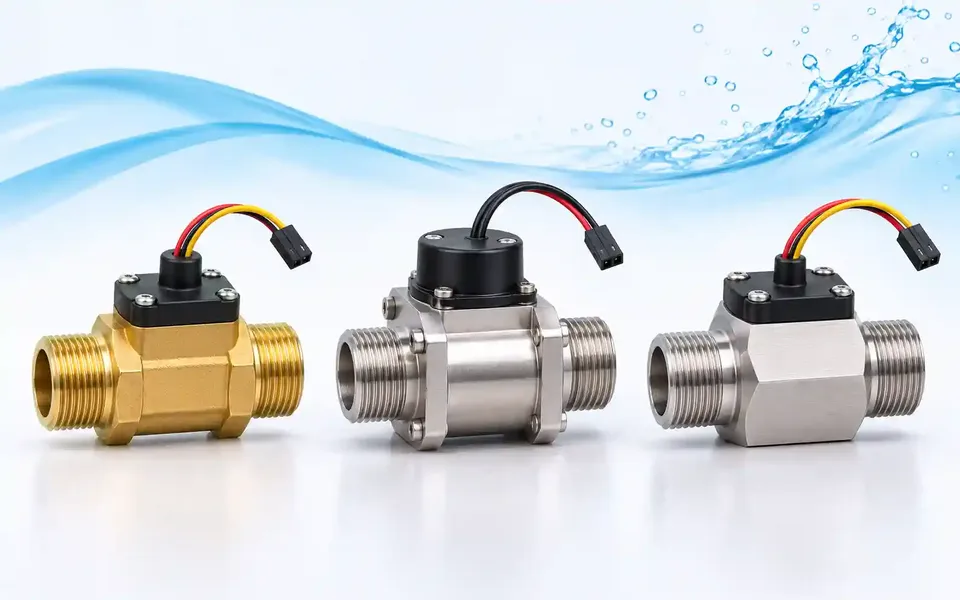
In this guide, we compare three flow sensor listings: a brass sensor available in two sizes, and two stainless steel sensors. We will also explain what to check before connecting one to a controller.
How does a water flow sensor work?
These sensors use a rotor and a Hall effect sensor. As water flows through the body, the rotor turns and the sensor produces electrical pulses. A controller can count the pulses and use a calibration figure to estimate the flow rate or total volume.
The reading is an estimate. The correct calibration, installation and operating range matter. A sensor may not measure very low flows reliably, even if it fits your pipe.
Compare the three sensors
The ranges below are from the Top Gadgets product listings. Check the label and specifications for the exact unit before ordering or installing.
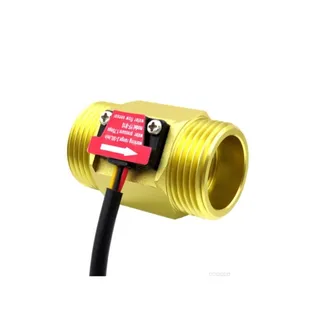
Brass YF-B10, G1 inch: listed flow range 2–50 litres per minute (L/min). The same product page also offers a ZJ-B5 G3/4 inch option, listed at 1–30 L/min.
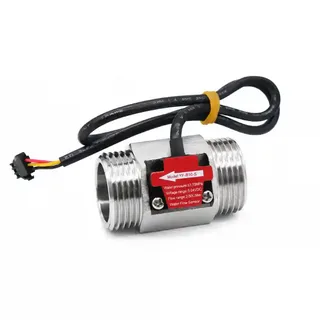
Stainless steel YF-B10-S, G1 inch: listed flow range 2–50 L/min.
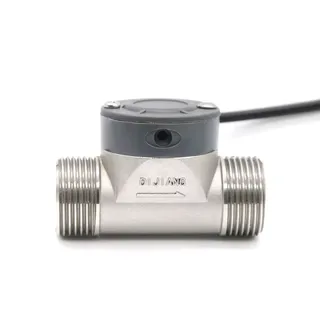
Stainless steel ZJSUS-DN25, G1 inch: listed flow range 20–280 L/min.
All three listings describe an NPN pulse output and a 3.5–24V DC supply range. Check the actual sensor's documentation and electrical output before wiring.
1. Brass YF-B10 / ZJ-B5: two connection sizes
The brass product offers a choice between a G1 inch YF-B10 and a G3/4 inch ZJ-B5. The smaller version may suit a system whose expected flow and fittings match its listed range. Choose by both the expected flow and the connection, not the thread alone.
2. Stainless steel YF-B10-S: a G1 option for 2–50 L/min
The YF-B10-S has a stainless steel body and a listed G1 connection. Its listed 2–50 L/min range is the same as the G1 brass version, but the electrical calibration details differ. Check the specifications for your unit rather than using the same code settings for both.
Stainless steel can be useful where the material suits the water and surroundings. The body material alone does not confirm that every wetted part is suitable for drinking water, food or a chemical. Ask for the full material and certification details if your application requires them.
3. Stainless steel ZJSUS-DN25: a higher flow range
The ZJSUS-DN25 is also listed with a G1 connection, but its stated flow range starts at 20 L/min and goes up to 280 L/min. It is therefore a different choice from a 2–50 L/min sensor. If your normal flow is below 20 L/min, do not assume this sensor will measure it accurately.
What should you check before buying?
Flow range: Check the lowest, usual and highest flow you expect. Choose a sensor whose specified range covers the measurements you need.
Pipe connection: Confirm the thread size and type, along with the fittings needed for your pipe.
Water conditions: Check pressure, temperature and water quality against the exact sensor's limits. Confirm that all parts touching the liquid suit your use.
Electrical output: Check the supply voltage, pulse output, pull-up needs and the input voltage limits of your controller.
Accuracy and calibration: Check the stated accuracy and test the installed sensor against a measured volume if your project needs a reliable estimate.
Can these sensors work with an Arduino or ESP32?
The product listings describe pulse outputs for controller projects, but do not connect a sensor based on its supply voltage alone. First confirm the signal type, wiring, pull-up voltage and input limits for your exact sensor and board.
For example, an ESP32 uses 3.3V logic. A signal pulled up to 5V or a higher voltage can damage its input. If required, use a suitable interface or level converter. Check the sensor's minimum supply separately: a sensor listed for 3.5V minimum should not simply be powered from a 3.3V pin.
Follow the board and sensor documentation. If you are unsure about the wiring, ask someone experienced with electronics. Keep electrical connections dry and turn off power before changing them.
How do you calibrate a flow sensor?
Start with the calibration information for your exact model. Then, where safe and practical, collect a known volume of water while your controller counts pulses. Compare the calculated volume with the measured volume and adjust your software as needed. Repeat the test at the flow rates you expect to use.
A higher number of pulses per litre can give finer counting resolution. It does not, by itself, guarantee better accuracy. The sensor, flow rate, installation and calibration all affect the result.
Which one should you choose?
For a system that normally flows between 2 and 50 L/min, compare the G1 brass YF-B10 and stainless steel YF-B10-S. If you need a G3/4 inch connection and the flow fits, check the brass ZJ-B5 option. For higher flows, consider the ZJSUS-DN25 only if its 20–280 L/min range and other limits fit your system.
Still unsure? Share your pipe connection, expected flow range, liquid, pressure, temperature and controller model with Top Gadgets before you order.
Frequently asked questions
Can I select a sensor just by its pipe size?
No. Two sensors with the same G1 connection can have very different flow ranges. Check both the connection and the expected flow.
Can I measure total water use?
A controller can estimate total volume by counting pulses and applying a suitable calibration. Check and test the result for your installation. These sensors should not be assumed to be certified billing meters.
Do I need to calibrate every sensor?
Use the supplied model-specific calibration as a starting point. If accuracy matters, test the installed sensor and follow its documentation.